Paste your notes.
Quiz in 5 seconds.
Every question shows the line it came from.
No account, two free a day, and Anki export stays free.
Open any question to see the line it came from. Paste 40 characters or more to start.
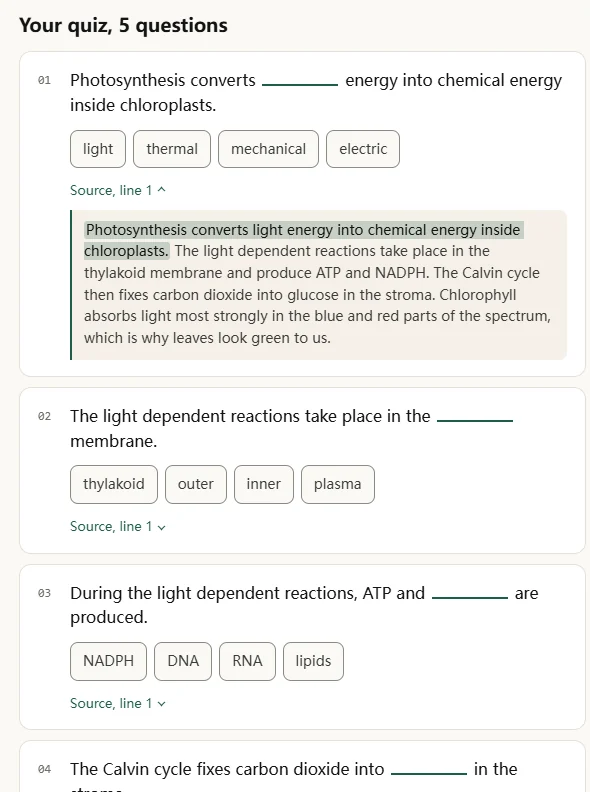
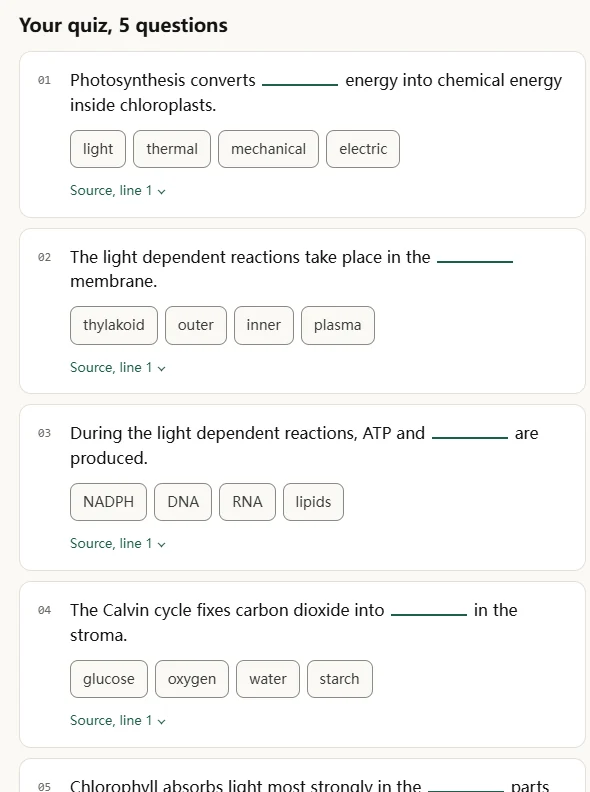
From a wall of text to something you can actually revise.
Copy the transcript
On YouTube, open the transcript panel and select all. Or paste the notes you already have, or upload a PDF or .txt.
Read the questions as they arrive
The first one lands in about a second. Answer them right here, on the page, while the rest are still being written.
Send them to Anki
One click, no paywall, no watermark. If you already run a review habit, the deck slots straight into it.
Export is free. It stays free.
Most study apps let you make the cards, then charge you to take them somewhere else. We think that is backwards. Export to Anki or CSV is on the free tier, and it will not move behind the wall later.
Two plans. The free one is not a trial.
You can use QuizPaste without ever giving us an email. Pro is for the week before finals, when two quizzes a day stops being enough.
Free
No account, no card.
- Two quizzes or decks a day
- Answer questions on the page
- Timed scoring and incorrect-answer retry
- Every question shows its source line
- Export to Anki and CSV
- Up to 25,000 characters at a time
Pro
For finals week.
or $4.92/mo billed annually ($59/year)
- 200 generations a month
- Whole lecture decks, up to 100,000 characters
- True/false and fill-in-the-blank question types
- History that follows you across devices
- Skip the queue at peak hours
Questions people actually ask
Do I really not need an account?
Really. Paste, generate, answer, export. The account is only there if you want more than two a day or your history on another device.
Can it make questions from a YouTube video?
Open the video, click the three dots, choose Show transcript, select all and copy. Paste that here. We do not scrape YouTube, so nothing breaks when they change their site.
How do I know it did not make the answers up?
Every question carries the sentence it came from. Open the source line under any question and the exact phrase is highlighted in your own text. If a question cannot point at your text, it never gets shown to you.
Is the Anki export a real deck file?
You get a tab separated file that Anki imports directly, and a CSV if you prefer to handle it yourself. Both are free, on the free tier, with no watermark. A packaged .apkg is on the list, but we would rather ship the honest version first.
Can teachers use it to make classroom quizzes?
Yes, as a drafting shortcut. Paste your handout or a chapter and you get multiple choice questions built from that material, each tied to the line it came from, so you can vet a set fast. It is not a classroom platform though: no rosters, no assignments, no auto grading. You copy the questions into whatever you already use, and the free tier is two generations a day.
What you can do with it
Revise from your own lecture notes
Paste the notes you already took and get questions that quiz you on them. Each question shows the exact line it came from.
Turn a YouTube transcript into flashcards
Copy a lecture or explainer transcript and turn it into a deck. You can send the resulting cards to Anki for review.
Do a quick self-test before an exam
Paste a chapter the night before and answer a short quiz on the page. The first questions arrive in about five seconds.
Work through a textbook chapter
Drop in a dense section and pull out the questions worth reviewing. It gives you a place to start instead of rereading the whole chapter.
For teachers: your own material, into a quiz you can vet
The tool a student runs the night before an exam is a formative quiz shortcut for the person who set it. Paste the handout you taught from and get questions built on it, not a generic bank. Here is what it does, and where it stops.
A formative quiz from the chapter you taught
Paste a handout, a chapter or a PDF and get multiple choice questions drawn from your own material. It saves the hour of writing stems and distractors by hand, so a quick class check or an exit ticket is a paste away.
Every question points back to your line
Each question shows the exact sentence it came from, and one that cannot point at your text is never shown. You can vet a set in a glance and see nothing was invented, the part most AI question generators leave you guessing at.
A deck to hand out, exported free
The same paste gives you an Anki importable file, a tab separated .txt or a CSV, to pass to a class that already reviews with Anki. No account, two runs a day on the free tier.
Where it stops
- No rosters, assignments, auto grading or gradebook. You copy the questions into whatever you already run.
- No export into Google Forms or a Quizlet class. It is a drafting tool, not a classroom platform.
- Multiple choice and flashcards only, not short answer or essay prompts.
- The free tier is two generations a day at up to 25,000 characters; a whole course of quizzes needs Pro.
- It works best when your notes are full sentences. A bare outline of keywords makes thinner questions.
Explore the tools
From the blog
More from the blog on studying from the material you already have.
You have the notes open in another tab.
Copy them, come back, and you will have questions to answer in about five seconds.